To show a free gift and free shipping progress on Shopify, set two thresholds, usually free shipping first and the gift a step above, and show both in one widget that says how much is left for the next reward. Two separate apps with two separate bars repeat the same message twice and take twice the room on a phone.
Why run both
Free shipping removes a reason to leave at checkout. A gift gives a reason to add one more item. They do different jobs, so they can work together: the first threshold gets the order over the line, the second grows it.
If you only have room for one, read free gift or discount code first; the same thinking applies to free shipping. For the gift basics, see the complete guide.
Which threshold goes first
Free shipping first, gift above it. The common pattern. Most shoppers care about shipping cost, so it goes near your average order value. The gift sits one item further, for shoppers who are already happy to spend. Example: free shipping at $50, a gift at $75.
Gift first, free shipping above it. Fits when shipping is already cheap or a flat fee, and the gift is the main hook. The free shipping threshold then works like a top tier.
Same amount for both. Simple to say ("Spend $60: free shipping and a gift"), but you give both rewards to the same orders, and lose the second step.
Set both lines from your own order values. Our post on picking the minimum spend has the method.
Word the progress
- Say the amount and the reward: "$12.00 to free shipping". Not "Almost there!".
- Once one reward is unlocked, say so, and point to the next: "Free shipping unlocked. $25.00 to a free gift."
- Name the shipping you mean. If only standard shipping is free, say "free standard shipping".
One widget, not two
A free shipping bar app and a gift app usually mean two bars, two pop-ups or a bar plus a chip, each with its own style and its own script. On a phone, they can cover a third of the screen. One widget for both keeps the message in one place and one style. More on keeping offers tidy in how to run a free gift offer without cluttering your product page.
Set it up in Tidebird Gift Lift
Gift Lift runs a free shipping offer next to the gift offer, in the same launcher and panel. On the free plan you can have one active gift offer and one active free shipping offer.
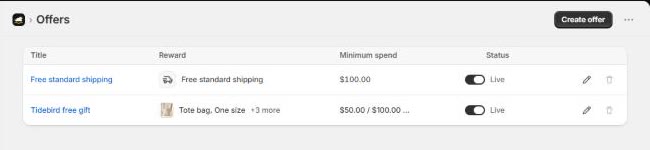
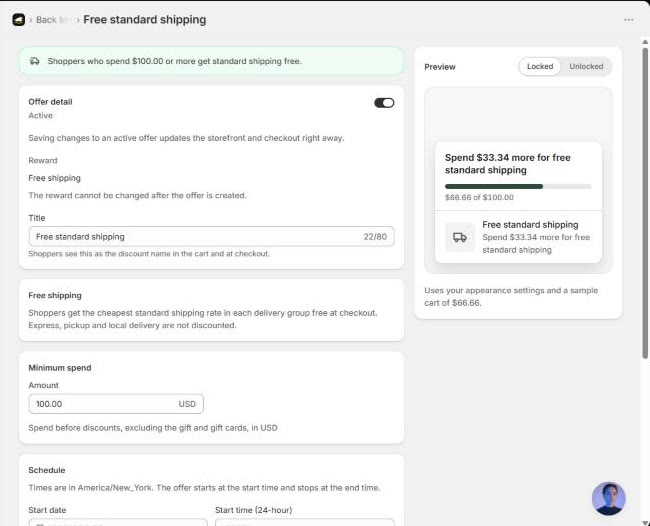
Create the free shipping offer under Offers, then Create offer, with Free shipping as the reward. Set the minimum spend and, if you like, a schedule. Shoppers who reach it get the cheapest standard shipping rate in each delivery group free at checkout. Express, pickup and local delivery are not discounted.
The look of the launcher and panel, for both offers, is set once under Customize: 16 launcher icons, 8 shapes, and themes that change everything at once.
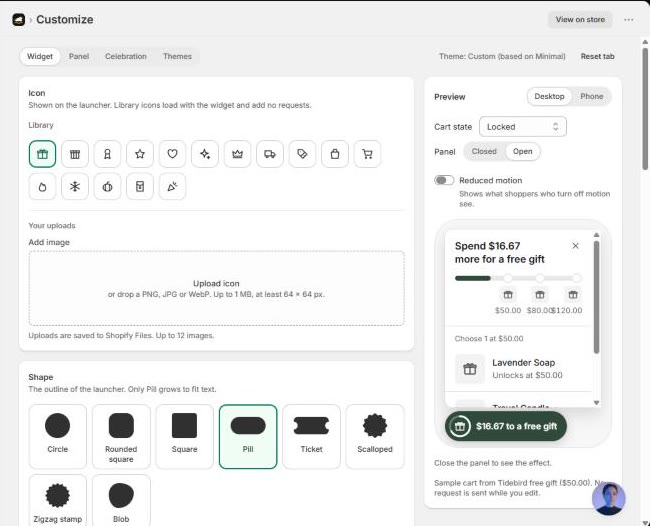

A free gift and free shipping in one small launcher, with progress for each. Free right now.
Questions merchants ask
Should free shipping or the free gift have the lower threshold?
Usually free shipping, near your average order value, with the gift a step above. Put the gift first when shipping is already cheap.
Which shipping rates does a free shipping offer cover?
In Tidebird Gift Lift, the cheapest standard rate in each delivery group. Express, pickup and local delivery are not discounted.
Do I need two apps for a gift and free shipping?
No. Shopify has a native free shipping discount, and some gift apps, Gift Lift included, run both offers in one widget.
Can both offers run on the free plan?
In Gift Lift, yes: one active gift offer and one active free shipping offer.