A free gift with purchase on Shopify gives shoppers a product at no cost once their cart reaches a minimum spend. You can set one up without an app: a Buy X Get Y discount with a minimum purchase amount makes the gift free, but the shopper has to add the gift to the cart.
An app adds the parts Shopify leaves out: adding the gift automatically, gift tiers, a choice of gifts and a progress message. The choice that matters most is how the gift is made free, because it decides what happens to your stock, your reports and your checkout.
1. When a gift with purchase fits
- It works best when you have a product that costs you little, ships light and most shoppers would like: samples, minis, accessories.
- A gift pushes the basket up only when it is tied to a minimum spend. Without one, it is a nice extra, not a way to grow order value.
- A discount code is the simpler choice when margins are thin or the gift would be hard to keep in stock. We compare the two in free gift or discount code.
2. How the gift becomes free: three ways
Every gift with purchase app has to turn a product's price into $0.00 somewhere. There are three ways to do it, and each one leaves a different trail in your admin.
Way 1: a $0 copy of the product
The app duplicates the gift as a hidden product priced at $0 and adds that copy to the cart. Watch for two products in your admin: the copy's stock and sales sit apart from the real product, and hidden copies can show up in search or collections.
Way 2: a discount added by the app
The app puts its own 100% discount on the gift line, in the cart or on a draft order. Another app's discount can clash with it, and one overrides the other. Vendors' own help pages warn about this.
Way 3: a Shopify discount on the real product
The real product goes into the cart, and a Shopify discount (the native one or an app's discount function) takes it to $0. One product, one stock count, and the order shows the real item. Checkout still needs a rule for when the cart drops below the minimum.
Find out which of the three it uses. The app's help pages usually say it, often in the section about inventory. More on the first way in free gifts without $0 product copies. Tidebird Gift Lift uses the third way: the gift is the real product, and a Shopify discount makes one unit free.
3. Set it up without an app
Shopify's own discounts can run a basic gift with purchase. In your Shopify admin:
- Go to Discounts, select Create discount, then Buy X get Y.
- Choose Automatic discount and give it a title shoppers will see, for example "Free gift over $75".
- Under Customer spends, choose Minimum purchase amount and enter the amount.
- Under Customer gets, set quantity 1, pick the gift product and set At a discounted value to Free.
- Set the dates and combinations, save, and place a test order.
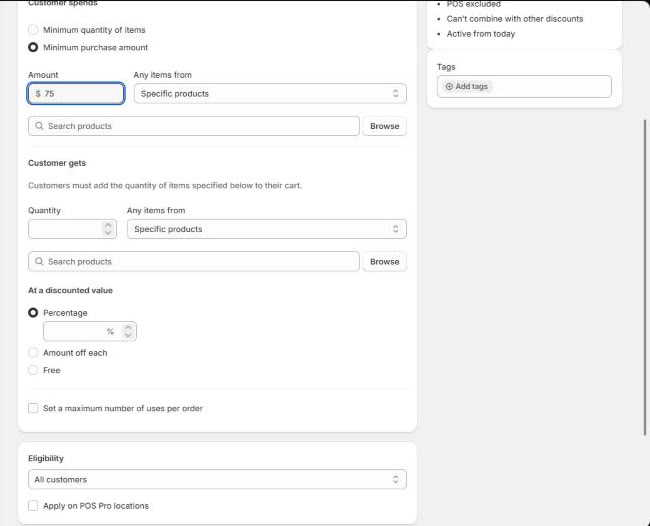
What the native setup leaves to you:
- It doesn't add the gift to the cart, so tell shoppers to add it themselves.
- Shoppers can't choose between gifts.
- There is no message that says how close the shopper is.
- Several gift levels need several discounts and careful combination settings. Check the current limits in your admin.
The full walk-through is in how to add a free gift on Shopify without an app.
4. Pick the gift and the minimum spend
The gift. Check its margin, the stock you have on hand, its weight and size, and whether most of your shoppers would want it. A gift nobody wants doesn't move the cart. More in picking the right gift product.
The minimum spend. Start from your own average order value and set the first minimum a step above it, so a typical shopper needs one more item. Look at your orders after two weeks and move it if needed. The method is in how to pick the minimum spend.
The gift's cost to you should stay below the margin on the extra spend you expect. Work it out with your own numbers, not a benchmark.
5. Show the offer without cluttering the store
Give the offer one home: a small chip in a corner, or the cart drawer. An announcement bar, a pop-up, a banner and a sticky footer all saying the same thing push your product further down the page.
Say how much is left in plain words: "$25.00 to a free gift" is clear and honest. Running free shipping too? Put both in one place: free gift and free shipping in one widget.
Oat Milk Body Wash
$32.00A gentle daily wash with colloidal oat and a soft linen scent.
Add to cartMore on this in how to run a free gift offer without cluttering your product page.
6. Go further: tiers, choice and auto-add
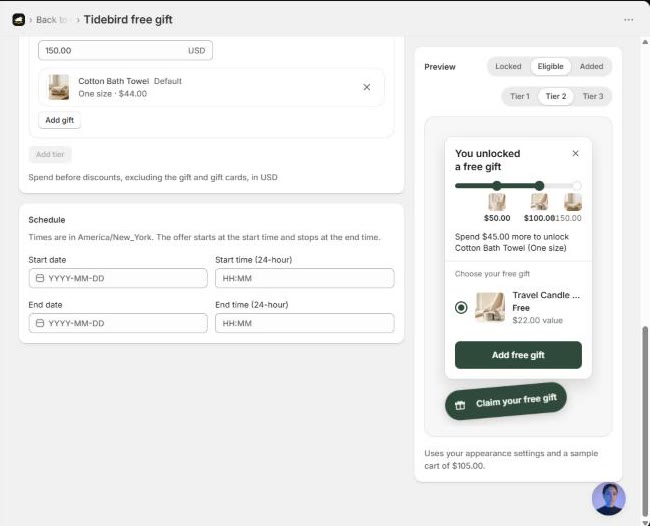
- Tiers. Set a few minimum spends, each with a better gift. The shopper gets one gift, from the highest tier their cart reaches. See tiered gifts on Shopify.
- Choice. Offer two or three gifts in a tier and let the shopper pick. See letting shoppers choose their gift.
- Auto-add. The gift goes into the cart when the cart qualifies, and is swapped when the cart reaches a higher tier. See how to auto-add a free gift.
7. Keep the gift free at checkout, and only then
Shoppers edit their carts. If the cart drops below the minimum after the gift is in it, something has to happen. There are three options: the gift goes through free, the gift gets charged, or checkout asks the shopper to remove it.
Asking to remove it is the honest one. Nobody gets a free gift below the minimum, and nobody gets a charge they didn't expect. If gifts are already being charged in your store, start with why a free gift gets charged at checkout.
Order summary
Checkout
8. Plan seasonal offers ahead
Set start and end dates in your store's time zone, so the offer goes live and stops on its own. Black Friday falls on the last Friday of November (November 27 in 2026): set the offer up and place a test order a week or two before. We cover the timeline in a Black Friday free gift offer, and Christmas to Lunar New Year in holiday gift with purchase.

A real product as the gift, up to three tiers, auto-add and a checkout guard, in one small chip. Free right now.
9. Launch checklist
- The gift is a real product, and its stock is tracked.
- The minimum spend comes from your own order value.
- The offer lives in one place and says how much is left.
- Test order: the gift is added, shows as $0.00, and stock goes down by one.
- Test order: the cart drops below the minimum after the gift is added.
- It looks right on a phone.
- Start and end dates are set.
Questions merchants ask
Can Shopify add a free gift to the cart automatically?
Not on its own. A Buy X Get Y discount makes the gift free, but the shopper has to add it. Adding it automatically needs theme code or an app.
Can I offer a free gift above a cart total without an app?
Yes. Use a Buy X Get Y discount with a minimum purchase amount, and set the gift's value to Free.
Does a free gift affect my inventory?
It should. If the real product is added, stock goes down like any sale. If an app adds a $0 copy, check how it updates the original product's stock.
What happens if the shopper removes items after adding the gift?
It depends on the setup. Some keep the gift free and some charge it. Tidebird Gift Lift's checkout asks the shopper to remove the gift.
Can I offer more than one gift level?
Yes, with tiers: each minimum spend unlocks a better gift. With Shopify's own discounts it takes several discounts; an app keeps it in one offer.
Should I give a free gift or a discount?
A gift lifts the basket when it is tied to a minimum spend, and it costs you the gift's cost, not its price. A discount is simpler when margins are thin.