To auto-add a free gift to the Shopify cart, you need either theme code that adds the gift with Shopify's cart API, or an app that does it for you. Shopify's own Buy X Get Y discount makes the gift free but never adds it: the shopper has to. Whichever way you choose, plan for what happens when the cart changes after the gift is in it.
Why Shopify doesn't add it on its own
A Shopify discount changes prices of items already in the cart. It doesn't put new items in. The Buy X Get Y form says so under Customer gets: customers must add the items to their cart. So the native method, covered in how to add a free gift without an app, relies on the shopper finding the gift and adding it.
Many don't. They don't see the banner, can't find the gift product, or assume it will appear. Then they get to checkout without it and either leave a support ticket or leave.
Two ways to auto-add
Theme code
A developer adds a script to your theme that watches the cart total. When it passes the minimum, the script adds the gift variant through Shopify's Cart AJAX API. Pair it with a Buy X Get Y discount so the gift is free.
It works, and you own it. It is also code you have to keep: it has to run on every cart change (cart page, cart drawer, quick add), handle the gift being out of stock, remove the gift when the cart drops, and survive theme updates.
An app
An app does the same job and keeps it working when your theme changes. Look at how the app makes the gift free (a $0 copy, its own discount, or a Shopify discount on the real product) because that decides what lands in your stock and reports. The complete guide compares the three.
The hard part: when the cart changes
Adding the gift is the simpler half. The cart keeps moving after that:
- The shopper adds more. With tiers, the cart may now reach a better gift. The old gift should be swapped, not left next to the new one.
- The shopper removes items. The cart drops below the minimum. The gift should go, or checkout should ask the shopper to remove it. It shouldn't be charged by surprise.
- The shopper removes the gift. Respect it. A script that adds the gift back every time the cart updates is the most common auto-add complaint.
Auto-add in Tidebird Gift Lift
In Gift Lift, auto-add is one switch. Go to Settings and turn on Add the gift automatically. When the cart reaches the minimum spend, the default gift is added without a click. Shoppers can still remove it.
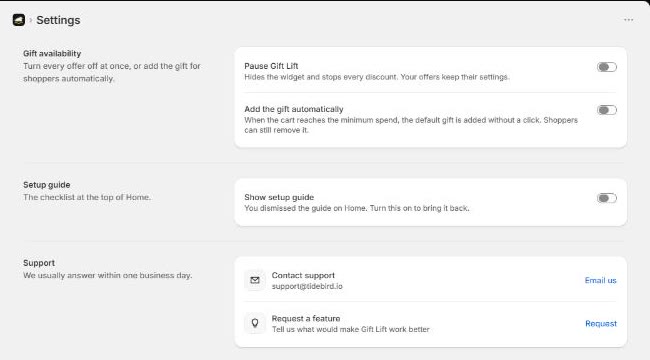
The default gift is the first gift in a tier, marked Default in the offer. You can set another gift as the default with the star next to it.
When the cart moves between tiers, the gift line is swapped: a cart that grows from the first tier to the second gets the second tier's gift instead. If the cart drops below every tier, the gift is no longer free, and checkout asks the shopper to remove it rather than charge for it.

Auto-add the real product, swap it when the cart changes tier, and keep checkout honest. Free right now.
Auto-add or let them pick?
Auto-add fits when there is one obvious gift, or one default most people would choose. It means nobody misses the gift.
Let shoppers pick when the gifts differ in a way that matters to them: sizes, scents, colors. You can do both: auto-add the default, and let shoppers swap it in the panel.
Test it
- Cross the minimum from the product page, the cart drawer and the cart page.
- Remove the gift, then add another item. Check the gift doesn't push back in against the shopper's choice.
- Move up a tier and back down. One gift line at a time.
- Drop below the minimum with the gift in the cart and go to checkout.
- Set the gift out of stock and cross the minimum.
Questions merchants ask
Can Shopify automatically add a free gift to the cart?
Not with its built-in discounts. They make the gift free once it is in the cart. Adding it needs theme code using the cart API, or an app.
Can shoppers remove an auto-added gift?
They should be able to. In Tidebird Gift Lift they can.
Which gift is added when a tier has several?
In Gift Lift, the tier's default gift: the first one, or the one you mark with the star.
What happens to an auto-added gift when the cart drops below the minimum?
In Gift Lift, the gift is no longer free, and checkout asks the shopper to remove it before paying.