You can add a free gift on Shopify without an app by creating a Buy X Get Y discount with a minimum purchase amount and setting the gift's value to Free. Shoppers who spend above the amount and add the gift to their cart get it at $0.00. Shopify won't add the gift for them, and there is no progress message, but for one simple offer it works.
Last checked in the Shopify admin in October 2026. Shopify changes its admin from time to time, so if a label looks different, look for the same idea nearby. For the bigger picture, see the complete guide to free gifts with purchase.
Set it up, step by step
- In your Shopify admin, go to Discounts and select Create discount.
- Choose Buy X get Y.
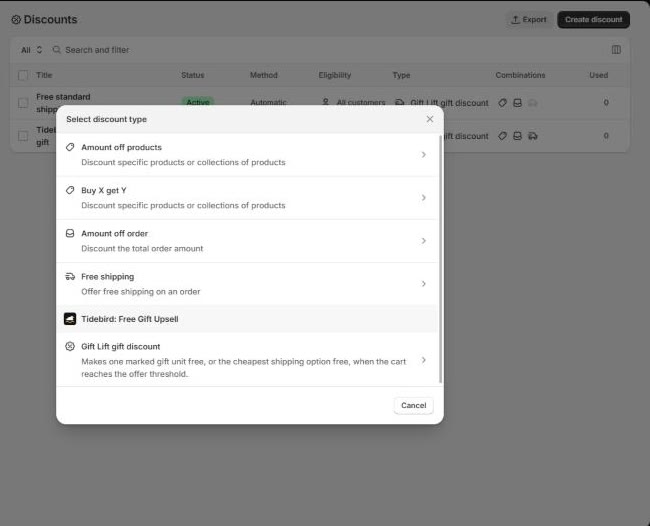
- Under Method, choose Automatic discount, so shoppers don't need a code. Give it a title. Shoppers see the title in their cart and at checkout, so write it for them: "Free tote over $75".
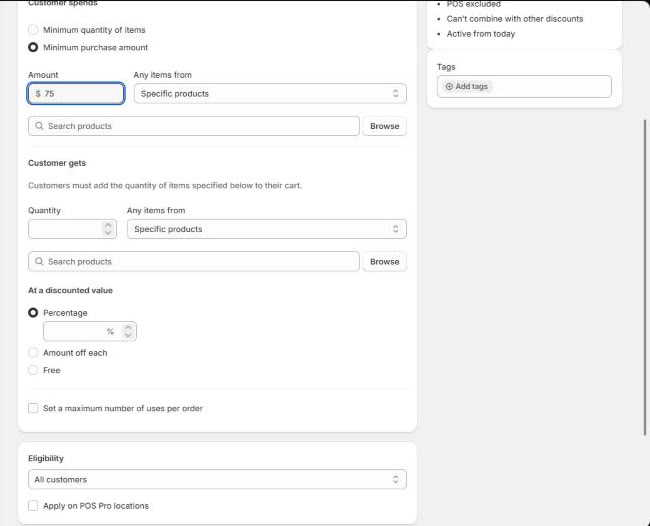
- Under Customer spends, choose Minimum purchase amount and enter the amount.
- Under Customer gets, enter quantity 1 and pick the gift product.
- Under At a discounted value, choose Free.
- Tick Set a maximum number of uses per order and enter 1, so one order gets one gift.
- Set the combinations and the active dates, then save.
What the amount counts
Next to the amount, Shopify asks which items count toward it: specific products or specific collections. Only those items count. If you want the whole cart to count, pick a collection that holds every product you sell. If you pick one product, only that product's line counts.
That is useful for some offers ("spend $50 on skincare, get a free mini"), and a trap for others. Read the field twice before you save.
Test it
- A cart above the amount, with the gift added, shows the gift at $0.00.
- A cart below the amount, with the gift added, charges the gift at full price.
- Two gifts in the cart: only one is free.
- Your discount codes behave the way you set in combinations.
The second test matters most. With the native discount, a shopper who adds the gift and then removes other items pays full price for the gift. Some will notice at checkout and remove it; some won't.
What it can't do
- It doesn't add the gift. The shopper has to find the gift product and add it. Tell them where, in your cart, banner or product pages. The options are in how to auto-add a free gift.
- No progress message. Nothing tells the shopper "$12.00 to a free gift". You can write a static banner, but it can't count.
- No choice. One discount, one gift product or a fixed set of them.
- No warning below the minimum. If the cart drops under the amount, the gift is charged at full price.
- The gift product must be visible. Shoppers can only add a product they can reach, so it needs to be published and findable.
Several gift levels
For "spend $50, get A; spend $100, get B", you create one Buy X Get Y discount per level. Then the combination settings decide what a $120 cart gets: both gifts, or one. Set the combinations on each discount, then test a cart at each level before you go live. How to space the levels: tiered gifts on Shopify.
When an app is worth it
The native setup is enough for one gift at one amount, with shoppers who don't mind adding it themselves. An app earns its place when you want the gift added for the shopper, a progress message, a choice of gifts, tiers in one offer, or a checkout that asks the shopper to remove the gift instead of charging it.
Whatever app you look at, ask how it makes the gift free. Tidebird Gift Lift adds the real product and makes one unit free with a Shopify discount function; it shows up in the same discount type picker as "Gift Lift gift discount".

Everything the native setup leaves to you: auto-add, progress, tiers, gift choice and a checkout guard. Free right now.
Not sure a gift is the right offer at all? Read free gift or discount code first.
Questions merchants ask
Can Shopify give a free gift above a cart total without an app?
Yes. Create a Buy X Get Y discount, choose Minimum purchase amount under Customer spends, and set the gift's value to Free.
Does Shopify add the free gift to the cart automatically?
No. The form says it: customers must add the items under Customer gets to their cart. Adding it automatically needs theme code or an app.
What happens if the cart drops below the minimum?
With the native discount, the gift stays in the cart at full price. Tell shoppers in your cart, or use an app that asks them to remove it at checkout.
Can I use a discount code instead of an automatic discount?
Yes. Choose Discount code under Method. Shoppers then need the code and the gift in the cart.
Can I offer different gifts at different amounts?
Yes, with one discount per level. Set the combination rules on each and test a cart at every level.