A Black Friday free gift offer on Shopify works when three things are ready before the week starts: a gift you have enough stock of, a minimum spend set from your own orders, and start and end dates that switch the offer on and off without you. Black Friday 2026 is on November 27 and Cyber Monday on November 30. This post walks through the four weeks before.
Why a gift instead of a bigger discount
During Black Friday week every store is cutting prices. A gift lets you join in without changing your prices, and it costs you the gift's cost, not its retail price. It also gives shoppers a reason to add one more item, because the gift only unlocks above a minimum spend.
It is not the right fit for every store. If your margins are thin or the shoppers you expect only come for a price cut, a discount may be the cleaner offer. We weigh the two in free gift or discount code. For the basics of how a gift offer works on Shopify, start with the complete guide.
A four-week timeline
- Four weeks out (early November). Pick the gift and count your stock. Order more now if you need it; restocks get slow in late November. See picking the right gift product.
- Three weeks out. Pull your average order value for the last 60 to 90 days and set the minimum spend a step above it. If you want tiers, set the second and third steps now too.
- Two weeks out. Build the offer, set the schedule, choose the look. Leave it ready to go live on the start date.
- One week out. Place test orders, check the offer on a phone, and brief whoever answers your support emails.
Put the start and end times, the minimum spend and the gift in one note for your team. When a shopper asks "do I still get the gift?" on Sunday night, nobody should have to open the admin to answer.
Build the offer
In Tidebird Gift Lift, go to Offers, then Create offer, and choose Free gift as the reward. Give it a title. Shoppers see the title as the discount name in the cart and at checkout, so "Black Friday gift" reads better than an internal name.
Add the first tier's minimum spend and pick the gift from your products. You can add up to three tiers and up to three gifts per tier. The first gift in a tier is the default.
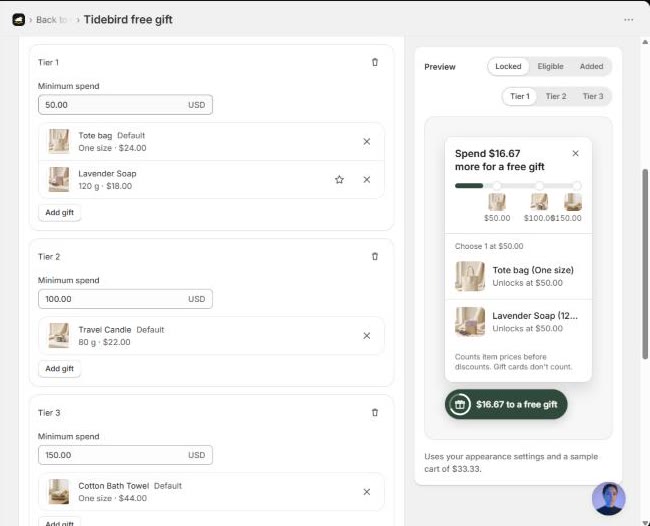
Only one gift offer can be active at a time. If you already run an everyday gift offer, decide how the two hand over: change that offer's tiers and gifts for the week, or turn it off when the Black Friday offer goes live.
Schedule the start and end
Scroll to Schedule and set a start date and time and an end date and time. Times use your store's time zone. The offer starts at the start time and stops at the end time, so it goes live at midnight on Friday without you awake to press a button.
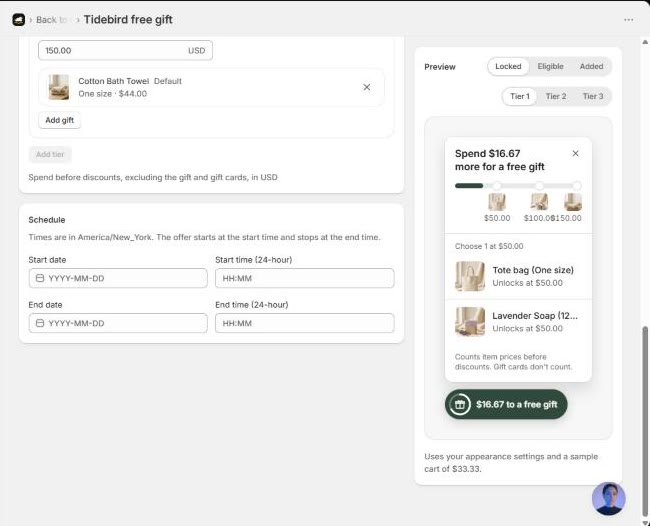
Pick the end on purpose. Ending on Monday night covers Cyber Monday; ending on Sunday keeps the gift special to the weekend. Either is fine, as long as your banner, emails and the schedule all say the same thing.
Switch the look for the week
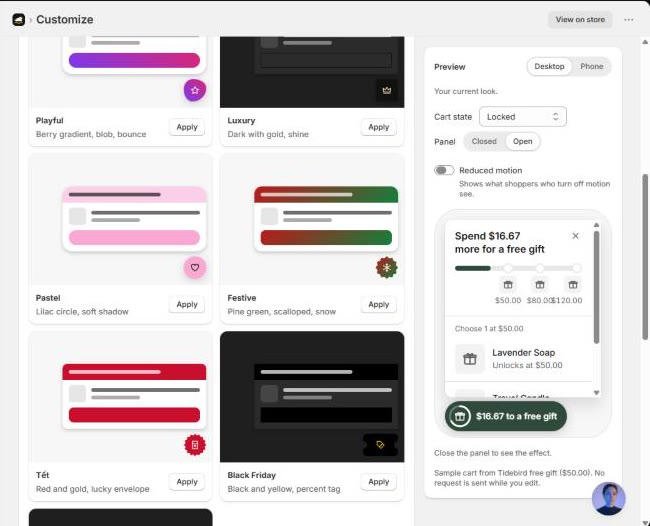
Under Customize, then Themes, Gift Lift has a Black Friday theme in black and yellow with a percent tag. A theme sets every widget, panel and celebration setting at once, and you can change anything afterwards.
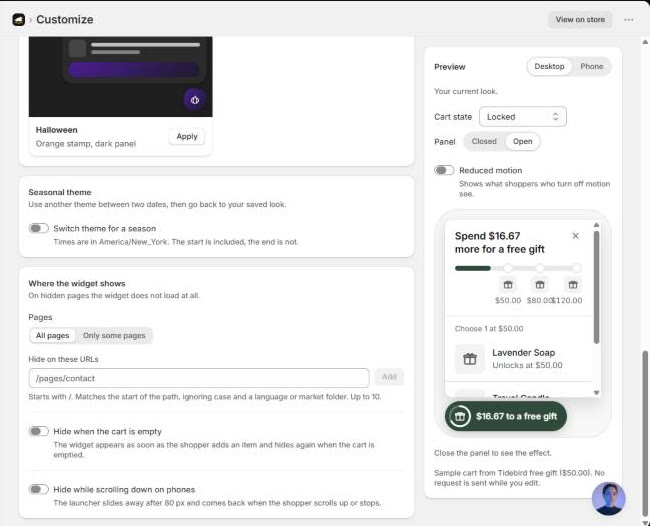
You don't have to switch it by hand. Turn on Switch theme for a season, pick the Black Friday theme and two dates. The start date is included and the end date is not, and after the end the widget goes back to your saved look.
Test before the rush
- A cart a little under the minimum shows how much is left.
- A cart above it gets the gift at $0.00, and the order shows the real product.
- Removing items after the gift is added: checkout asks the shopper to remove the gift.
- Your Black Friday discount codes and the gift work together the way you expect.
- On a phone, the panel opens as a bottom sheet and stays clear of Add to cart.
In Gift Lift the minimum counts item prices before discounts, without the gift and gift cards. So if you run a sitewide 20% code the same week, a cart worth $100 before the code still reaches a $100 tier. Decide whether that is what you want, set the tiers with it in mind, and test one cart with the code applied.

Schedule the offer, switch to the Black Friday look by date, and keep the gift honest at checkout. Free right now.
After the weekend
The schedule ends the offer and the seasonal theme switches back on its own. Then open Home in Gift Lift: it shows how many carts saw the offer, how many unlocked the gift, how many added it, and the average extra spend to unlock. Offer usage shows how many orders used each offer; counts update with a delay.
The holidays come right after; holiday gift with purchase covers Christmas to Lunar New Year. Write down what you learn while it's fresh: did shoppers stop a little below the minimum, did the gift run out, which tier did most carts reach. That note is your plan for next year.
Questions merchants ask
When should I set up a Black Friday gift offer?
Pick and stock the gift about four weeks before, and have the offer built and tested a week before. For 2026, that means stock by early November and a finished offer by November 20.
Can a gift offer run alongside Black Friday discount codes?
Yes, but test the combination. Check whether your codes combine with other discounts, and place a test order with a code and the gift in the same cart.
Will the offer turn itself off?
With a schedule, yes. Set an end date and time in your store's time zone and the offer stops then.
Should I use tiers for Black Friday?
Tiers give shoppers who are already spending more a reason to go one step further. Keep it to two or three steps so the message stays short.