A free gift gets charged at checkout on Shopify when the discount that makes it free stops applying: the cart fell below the minimum, another discount took its place, or the gift in the cart isn't the item the discount targets. Find which one by opening the order, then fix the setup, and add a rule that asks the shopper to remove the gift instead of charging for it.
First, look at the order
Open the order in your Shopify admin and check three things on the gift line:
- Which product and variant is it? The real product, a $0 copy, or a different variant from the one in your offer?
- Which discounts were applied? The order lists every discount on the order and on each line.
- What was the subtotal of everything else? Compare it with your minimum, and remember which items count toward it.
Those three answers point to one of the causes below.
Seven common causes
1. The cart dropped below the minimum
The shopper added the gift, then removed something. With Shopify's native Buy X Get Y discount, the gift stays in the cart and goes back to full price. This is the most common cause, and the hardest for shoppers to spot. The fix is a checkout rule; see Ask, don't charge below.
2. The minimum counts different items than you think
A native Buy X Get Y minimum only counts items from the products or collections you picked. If you picked one collection, a cart full of other products never qualifies. Apps differ too: some count before discounts, some after; most leave out gift cards. Check your offer's settings and write the rule in your offer text.
3. A discount code replaced the gift discount
When two discounts aren't set to combine, Shopify won't apply both. If a shopper enters a code that doesn't combine with the gift discount, the gift can lose its discount. Check Combinations on both discounts.
4. Another app's discount clashed
Two apps that both change prices can override each other. Some vendors warn about this in their help pages; Monk's help, for example, covers how its gift discount and other discounts interact. Turn off the other app's discount on a test store and try again.
5. The wrong variant is in the cart
The discount targets the 50 ml soap; the shopper added the 200 ml one. Only the exact variant in the offer is free. Make the gift's variant clear, or offer each variant as a choice.
6. More than one gift in the cart
If one unit is free, the second is charged. Shoppers who tap "add" twice pay for one.
7. A $0 copy was set up wrong
With apps that copy the gift as a $0 product, the copy's price can be edited by mistake, or the real product added instead of the copy. Check the gift line's product. The trade-offs of copies are in free gifts without $0 product copies.
Ask, don't charge
Causes 2 to 7 are setup fixes. Cause 1 will always happen, because shoppers edit carts. What matters is what checkout does next. There are three options: let the gift through free, charge for it, or ask the shopper to remove it.
Asking is the honest choice. Nobody gets a free gift below the minimum, and nobody gets a charge they didn't expect.
Order summary
Checkout
Shopify has a way to do this: a cart and checkout validation function, which can stop checkout with a message. Tidebird Gift Lift uses one as its checkout guard. When the cart no longer qualifies for the gift, checkout asks the shopper to remove it. Gift Lift's Home page shows the guard's state under On your storefront.
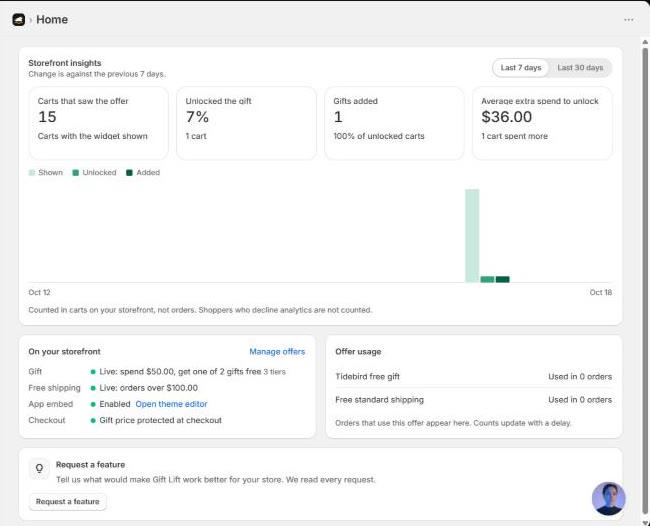

The real product as the gift, made free by Shopify, with a checkout guard that asks instead of charging. Free right now.
Stop it happening again
- Say in the offer which items count toward the minimum.
- Set combinations on purpose, and test a cart with your most-used code.
- Run one app that changes gift prices, not two.
- Make the gift variant clear, and limit the gift to one per order.
- Have checkout ask the shopper to remove the gift when the cart no longer qualifies.
- After any change to the offer, place one test order above and one below the minimum.
For the full setup from scratch, see the complete guide.
Questions merchants ask
Why is my free gift showing full price at checkout?
The discount that makes it free isn't applying. The usual reasons: the cart is below the minimum, another discount replaced it, or the wrong variant is in the cart.
A shopper was charged for the gift. What should I do?
Refund the gift line, then open the order to find the cause and fix it so it doesn't happen again.
Can Shopify block checkout when the gift is no longer free?
Yes, with a cart and checkout validation function. Apps such as Tidebird Gift Lift use one to ask the shopper to remove the gift.
Do discount codes cancel a free gift?
They can, if the two discounts aren't set to combine. Check Combinations on both.