You can run a Shopify free gift without a $0 product copy: add the real product to the cart and let a Shopify discount take it to $0.00. Some gift apps instead duplicate the gift as a hidden product priced at $0. That copy has its own stock, its own sales and its own listing, and those details decide how clean your inventory and reports stay.
What a $0 copy is
For a long time, apps had no direct way to change one product's price in a shopper's cart. So a common workaround is to create a second product, a copy of the gift with the price set to $0, hide it from the storefront, and add that copy to the cart when the shopper qualifies. Some apps' help pages describe this method openly; for example, Digismoothie's Gift Box help explains how its free gifts are added to orders.
It isn't wrong. It is a trade-off, and the trade-off shows up later, in places you don't look on launch day. The complete guide compares it with the other two ways a gift becomes free.
What a $0 copy leaves behind
- Two products for one item. Your catalog now has the real lavender soap and a $0 lavender soap. Multiply by every gift and every tier.
- Stock in two places. The copy has its own inventory. Some apps sync it back to the real product when it sells; check that yours does, or you'll ship more soap than your stock count says you have.
- Sales under another name. Reports that group by product show gift orders under the copy, not the real item. Your best-seller list and cost reports need a second look.
- Hidden isn't always hidden. A copy can show up in storefront search, a smart collection, a product feed or a marketplace sync if its tags or type match a rule. Check every channel the product could reach.
- Clean-up after. When the offer ends, the copies stay until someone removes them.
The other way: the real product, made free
Shopify discounts can take a cart line to $0.00. That is what the native Buy X Get Y discount does (see how to add a free gift without an app), and what an app's discount function can do too. The real product goes into the cart, and a discount makes one unit free.
- One product, one stock count. The gift sells down like any other unit.
- Orders show the real item with a discount, so reports group it correctly.
- Nothing to hide and nothing to clean up after.
The catch: because the gift is a real priced product, something has to stop it being charged if the cart drops below the minimum. That is what a checkout rule is for.
How to check any app before installing
- Read the app's help page on inventory. Look for "duplicate", "clone", "$0 product" or "gift product".
- After installing on a test store, check Products for new hidden items.
- Check Discounts for what the app created, and what type it is.
- Place a test order and look at the order: which product is on the gift line, and what happened to its stock.
How Tidebird Gift Lift does it
Gift Lift uses the real product. The gift is a real variant from your catalog, and a Shopify discount function makes one marked gift unit free when the cart reaches the offer's minimum. In your admin it shows up as its own discount type.
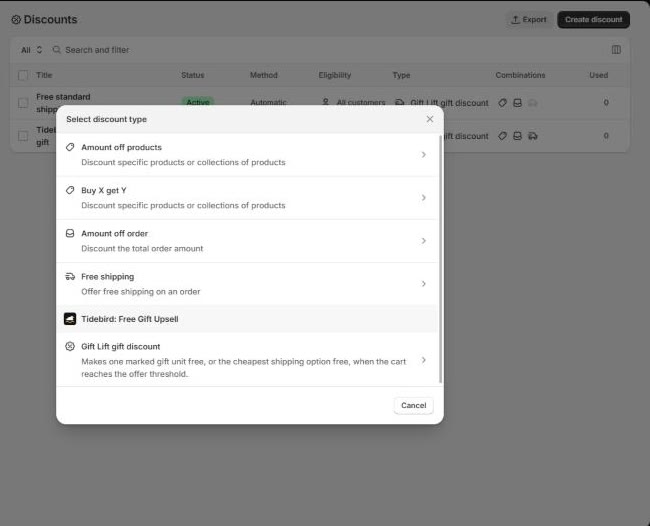
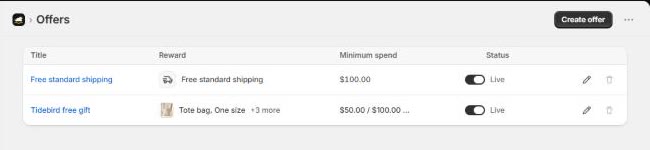
No product copies are created. Your offers list shows the real products you picked as gifts.
Gift Lift also adds a checkout rule: if the cart no longer qualifies, checkout asks the shopper to remove the gift. More on that in why a free gift gets charged at checkout.

The real product as the gift, made free by a Shopify discount. No $0 copies, one stock count. Free right now.
Questions merchants ask
Do I need a $0 product to give a free gift on Shopify?
No. A Shopify discount can take the real product to $0.00 in the cart, natively with Buy X Get Y or through an app's discount function.
Does a free gift reduce my stock?
With the real product, yes, like any sale. With a $0 copy, it depends on whether the app syncs the copy's sales back to the original.
Can a hidden $0 product show up in my store?
It can, if a collection rule, search, feed or sales channel picks it up. Check each channel after installing.
How do I know which method an app uses?
Read its inventory help page, then check Products and Discounts on a test store after a test order.