To let shoppers choose their free gift on Shopify, offer two or three gifts at the same minimum spend and show them side by side once the cart qualifies. The shopper picks one, and only that one is free. Shopify's own discounts don't show a picker, so you need theme code or an app. Keep the options few, make one the default, and pick a layout that fits your product photos.
When a choice helps, and when it doesn't
A choice helps when the gifts differ in a way that matters to the shopper:
- Scent or flavor: lavender or eucalyptus soap.
- Size or shade: where the wrong one is useless.
- Who it's for: a gift for the shopper, or one to pass on.
It doesn't help when the options are close: three similar minis make the shopper think about something that doesn't matter. Then one good gift is better. Picking the gift itself is covered in picking the right gift product.
How many gifts to offer
Two or three. More than three turns a moment of "nice, a gift" into a shopping trip, and on a phone the extra options fall below the fold. If you have more gift products, rotate them between offers instead of showing them all at once.
Pick a default
Make the gift most people would choose the default. It is the one that is selected when the panel opens and, if you add gifts automatically, the one that goes into the cart. Shoppers who care can switch; shoppers who don't still get a gift without deciding anything. More on that in how to auto-add a free gift.
Set it up
Without an app, Shopify's Buy X Get Y discount can make any one of several products free, but shoppers have to find and add the one they want themselves. There is no picker. See the native setup.
In Tidebird Gift Lift, each tier in an offer holds up to three gifts. In the offer, select Add gift under a tier and pick the product from your catalog. The first gift is the default; select the star next to another gift to make it the default instead.
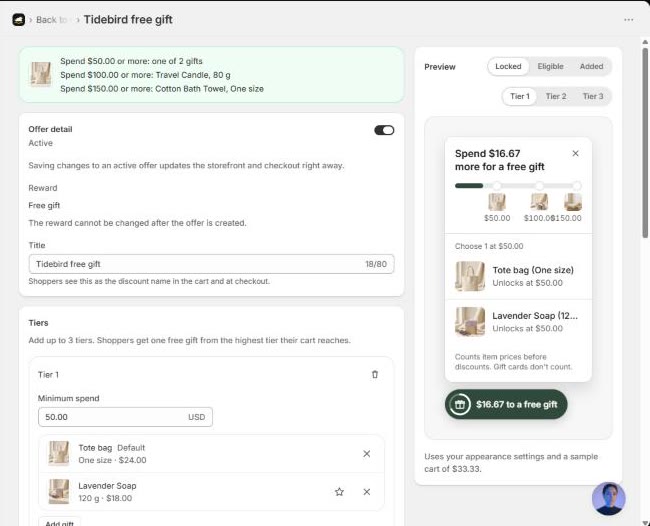
With tiers, each tier can have its own choice. A common pattern: a choice of two small gifts at the first tier, one bigger gift at the top. See how to set up tiered gifts.
List, cards or carousel
Under Customize, then Panel, the Gift layout setting decides how the choices in a tier are shown. Shoppers still pick one.
- List: radio rows. Compact, reads well with short names, and fits most stores.
- Cards: two or three columns. Better when the product photos do the selling.
- Carousel: scrolls sideways. Keeps the panel short on a phone.
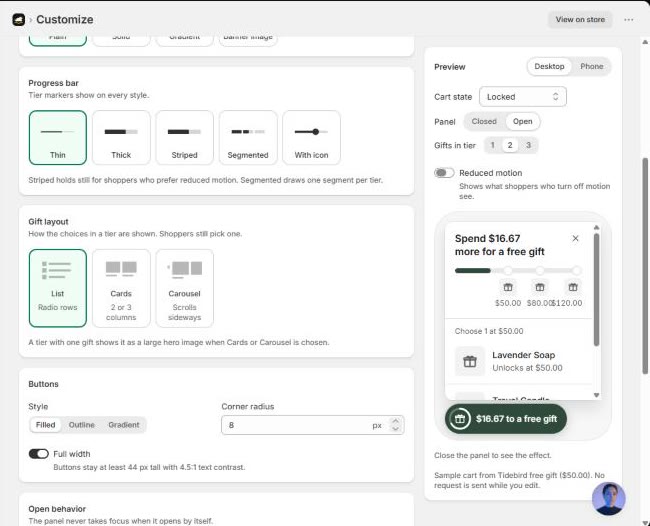
On screens under 640 px wide, the panel opens as a bottom sheet, so check your layout on a phone in the preview before saving.

Up to three gifts per tier, a default you choose, and list, cards or carousel layouts. Free right now.
Questions merchants ask
Can Shopify let customers choose a free gift without an app?
Partly. A Buy X Get Y discount can make one of several products free, but there's no picker; shoppers have to find and add their choice.
How many gift options should I offer?
Two or three. More slows the shopper down and doesn't fit well on a phone.
Do shoppers get every gift in the choice?
No, one. In Tidebird Gift Lift, shoppers get one free gift, from the highest tier their cart reaches.
Which layout should I use?
List for short names and plain photos, cards when the photos sell the gift, carousel to keep the panel short on phones.